

Learn how to locate your Demo UUID to use within Consensus Integrations
Several integrations utilize your Demos UUID to capture additional information or send information into Consensus for a particular action. In this article we will walk through how you can find your Demo's UUID.
- Navigate to Demo Library under the Demos dropdown section in the Left Hand Navigation

Demos > Demo Library - Within Demo Library, find the Demo for which you want to get the UUID then click the Pen (Edit)(
 ) Icon.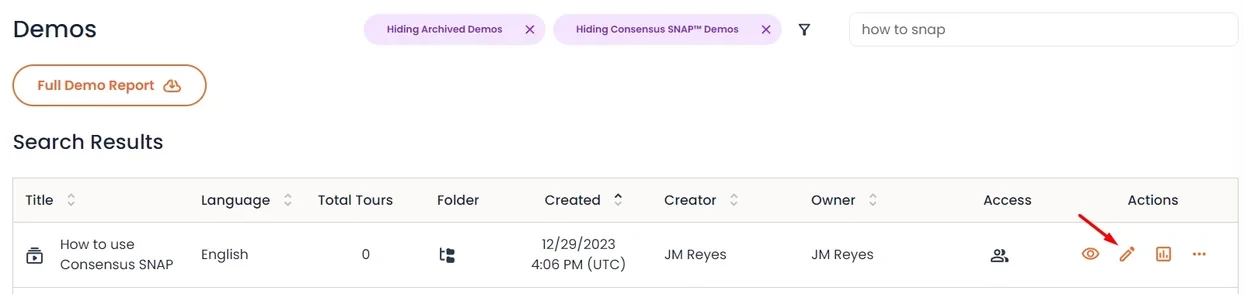
pencil/edit icon - Within the DemoWizard, the Demo UUID can be located within the URL. The Demo UUID is the set of numbers and letters after the last / within the URL
-
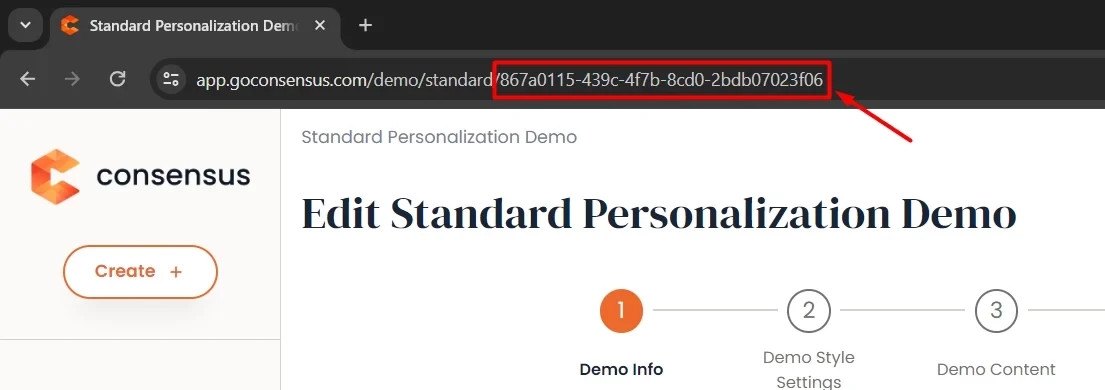
UUID
-
That's it! You can now use your Demo UUID within your integrations as needed.